PharmaSUG知识库建立(2/2)
会议PDF文件获取
上一篇文章中我们能够得到会议文章的链接,接下来遍历下载全部PDF文件,下载5000+篇PDF会议论文,文件大小在2GB多。这部分代码我放在个人网站里(https://allensrj.top),如果感兴趣可以下载来玩玩。拿到会议文献PDF版之后,我们就可以尝试实现 RAG。
RAG知识库实现思路
RAG指的是信息检索增强,核心思想是AI在和进行问答前,我们给它做一个知识“外挂”,对话时AI能够开卷考试、拼命翻书查阅,然后再输出相对准确的结果。这里给它做知识“外挂”的过程,需要依赖另一个模型:嵌入模型(Embedding Model)来完成的。
实现思路:
-
现将已下载的PDF内容进行提取、用嵌入模型进行向量化;
-
再通过api调用与LLM进行对话时结合向量化结果,达到准确输出的目的。
PDF文字提取
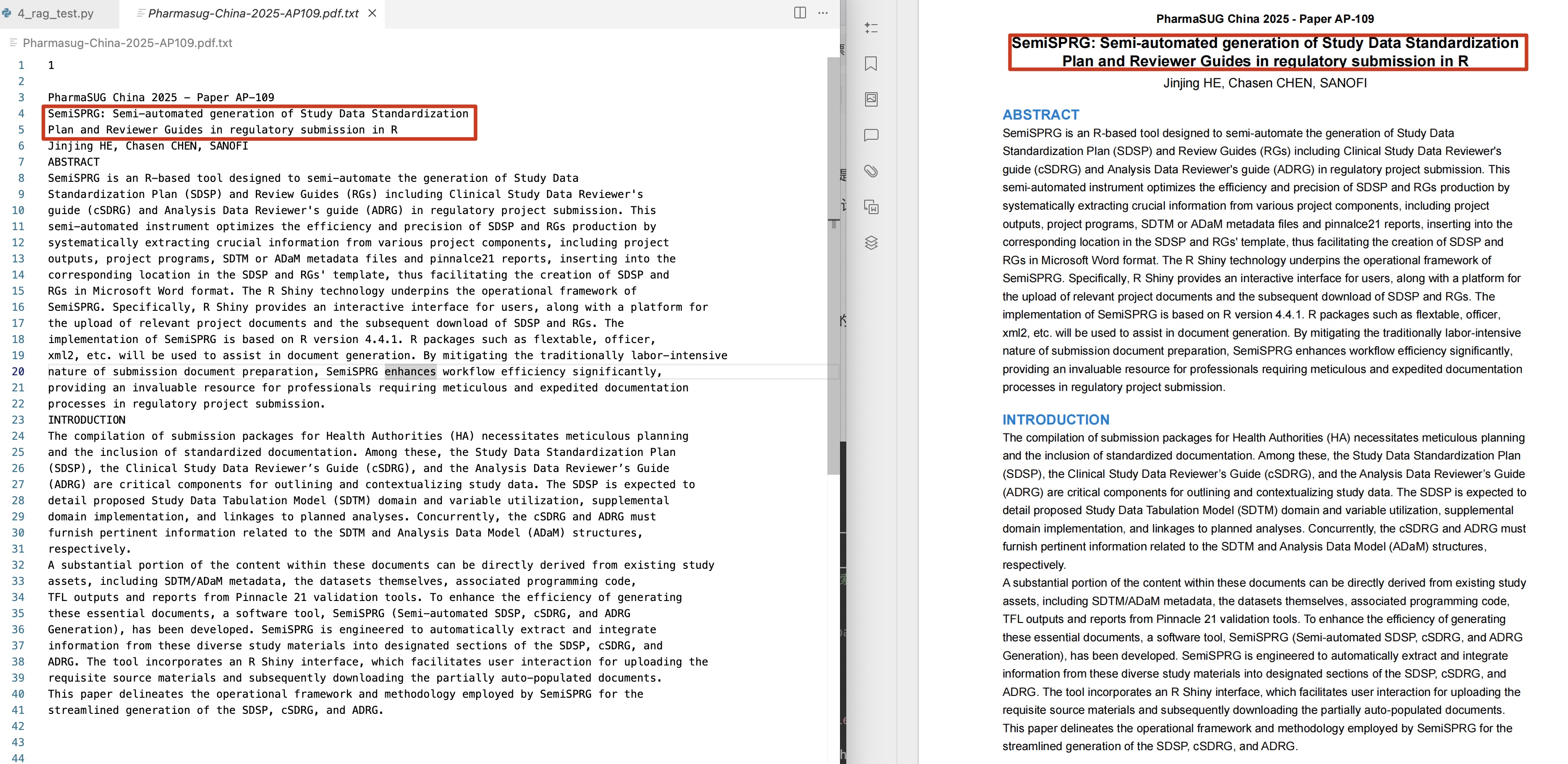
用pymupdf库进行提取,我给出的代码示例是获取某篇PDF文章第一页pdf的内容,获取结果如下:
import pymupdf
import pandas as pd
import numpy as np
def extract_df_content(pdf_path, common_text_font):
doc = pymupdf.open(pdf_path)
page = doc[0] # 第一页索引为0
txt = page.get_text() # 提取第一页的所有文本内容
# save
with open(f'{pdf_path.split("/")[-1]}.txt', 'w', encoding='utf-8') as f:
f.write(txt)
doc.close()
pdf_path = './pdf_file_folder/Pharmasug-China-2025/Pharmasug-China-2025-AP114.pdf'
extract_df_content(pdf_path, common_text_font='ArialMT')RAG实现
实现的方法参考GIT项目:https://github.com/datawhalechina/wow-rag
该项目是一个简单实现RAG的举例,我尝试过后认为能用,但是这个项目支持智谱请言的模型,所以需要去该平台(https://open.bigmodel.cn/)获取API Keys进行后续代码运行。
实现代码思路:首先是设置一系列embedding模型以及问答模型进行基础设置,然后将刚才PDF文章的摘要以txt的格式读进去
# --- coding: utf-8 ---
import os
from llama_index.embeddings.zhipuai import ZhipuAIEmbedding
from llama_index.core import SimpleDirectoryReader,Document
from llama_index.core import VectorStoreIndex
from llama_index.vector_stores.faiss import FaissVectorStore
import faiss
from llama_index.core import StorageContext, load_index_from_storage
from llama_index.llms.zhipuai import ZhipuAI
# ----- 模型设置
api_key = ""
emb_model = "embedding-2"
embedding = ZhipuAIEmbedding(
api_key = api_key,
model = emb_model,
)
base_url = "https://open.bigmodel.cn/api/paas/v4/"
chat_model = "glm-4-flash"
llm = ZhipuAI(
api_key = api_key,
model = chat_model,
)
# 从指定文件读取,输入为List
documents = SimpleDirectoryReader(input_files=['./Pharmasug-China-2025-AP109.pdf.txt']).load_data()其次是构建embedding模型的节点,将内容读取进来构建成可以被问答AI所获取的json数据格式:
# 构建节点
from llama_index.core.node_parser import SentenceSplitter
transformations = [SentenceSplitter(chunk_size = 512)]
from llama_index.core.ingestion.pipeline import run_transformations
nodes = run_transformations(documents, transformations=transformations)
# 构建索引
from llama_index.vector_stores.faiss import FaissVectorStore
import faiss
from llama_index.core import StorageContext, VectorStoreIndex
# 从上一节得知,智谱embedding-2的维度是1024
dimensions = 1024
vector_store = FaissVectorStore(faiss_index=faiss.IndexFlatL2(dimensions))
storage_context = StorageContext.from_defaults(vector_store=vector_store)
index = VectorStoreIndex(
nodes = nodes,
storage_context=storage_context,
embed_model = embedding,
)
# save index to disk
persist_dir = "dist_dir"
index.storage_context.persist(persist_dir)
# load index from disk
from llama_index.vector_stores.faiss import FaissVectorStore
import faiss
from llama_index.core import StorageContext, load_index_from_storage
vector_store = FaissVectorStore.from_persist_dir(persist_dir)
storage_context = StorageContext.from_defaults(
vector_store=vector_store, persist_dir=persist_dir
)
index = load_index_from_storage(storage_context=storage_context,embed_model = embedding)
print(index)最后建立提问,问一下什么是文章中提到的SemiSPRG,然后就可以发现AI已经读取了向量化内容,并且做出了应答:
query_engine = index.as_query_engine(llm=llm)
# 回答提问
response = query_engine.query("What is SemiSPRG?")
print(response)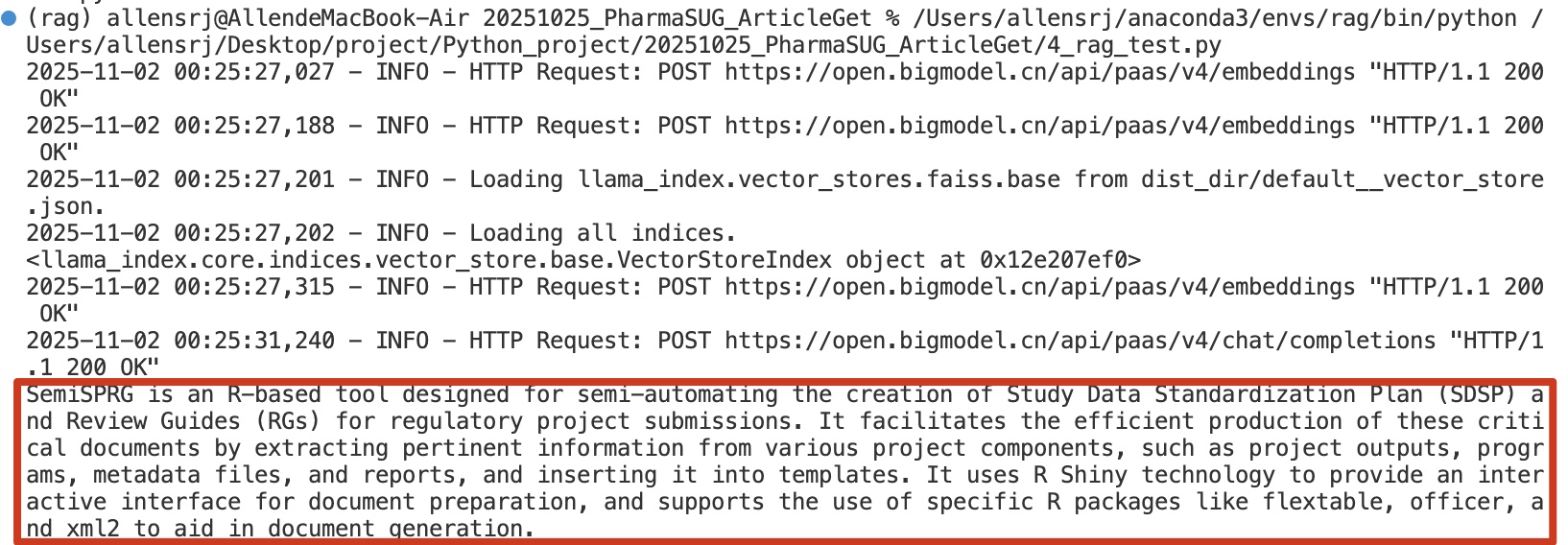
这样我们就实现了一个简单的llama_index方法的RAG模型。
项目回顾
我们回顾一下项目的全部流程:
-
首先去指定网站获取需要抓取的PDF文件的标题、链接;
-
通过遍历链接下载PDF文章;
-
用embedding模型逐步将PDF文章解析做成AI能够读取的Json格式;
-
通过调用问答模型与解析数据的交互,实现对制定PDF中文字的RAG问答。
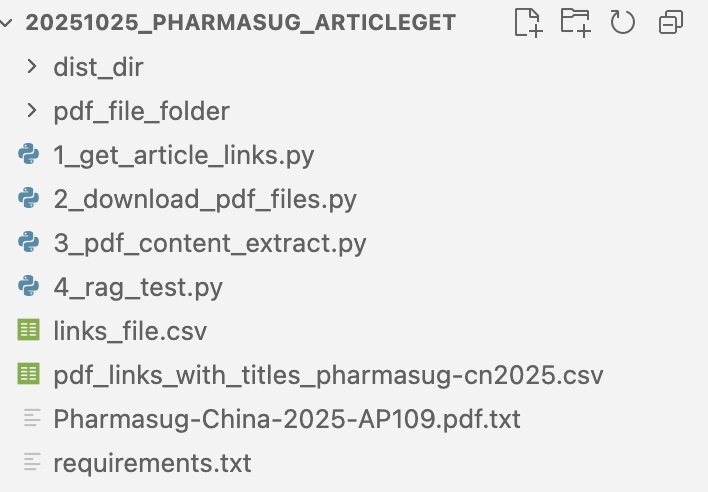
上述过程我做成了4个py脚本,放在个人网站,只需顺序运行即可复现上述流程。
个人AI项目探索的思考
其实截止这一步,我只是复现了针对一篇PDF文章某一页的RAG模型,并没有实现对5000+篇PharmaSUG文档的知识库建立,没有继续的原因如下:
-
首先因为PDF的解析有很多复杂的点,比如一整篇PDF文章里图片和表格如何解析做成Json格式、多达5000+篇文章的解析时间、数据大小、项目架构等等都需要考量;
-
这个RAG是通过调用API实现的,后面数据量上去了,和本地数据库的交互、运行速度如何尚不明确;
而上述两点,我认为也是个人实现AI应用的难点,个人有业务上的认识、深刻的思考,但是如何与AI结合的过程并不容易,就这个项目而言既要有很好的技术能够解析PDF文件、又要对项目架构有理解,同时还需要足够的硬件运行或者调用AI,比如本地运行LLM模型等等。